SMS Messaging & Opt-In
Last updated August 26, 2026.
Who sends these messages
SMS text messages are sent by Timber Health, Inc. (the developer of the Captrix platform, https://captrix.ai) on behalf of the contracting healthcare practice you are interacting with.
What messages you may receive
- Appointment notifications — confirmations, reminders, and follow-ups for appointments you booked or requested with the practice.
- Care & callback notifications — responses to calls or messages you initiate with the practice.
- On-call staff alerts — for authorized practice staff only, urgent notifications that an after-hours caller may need attention. Staff enable these by entering their own mobile number in the Captrix dashboard.
We do not send marketing or promotional text messages, and we never sell or share mobile information with third parties for marketing.
How you opt in
Providing your mobile number is never on its own treated as consent to be texted. You are only enrolled when you take a separate, affirmative action, and consent is never a condition of booking, of receiving care, or of any other service. There are four ways consent is given, and each is described in full below.
1. Online booking or intake form (web)
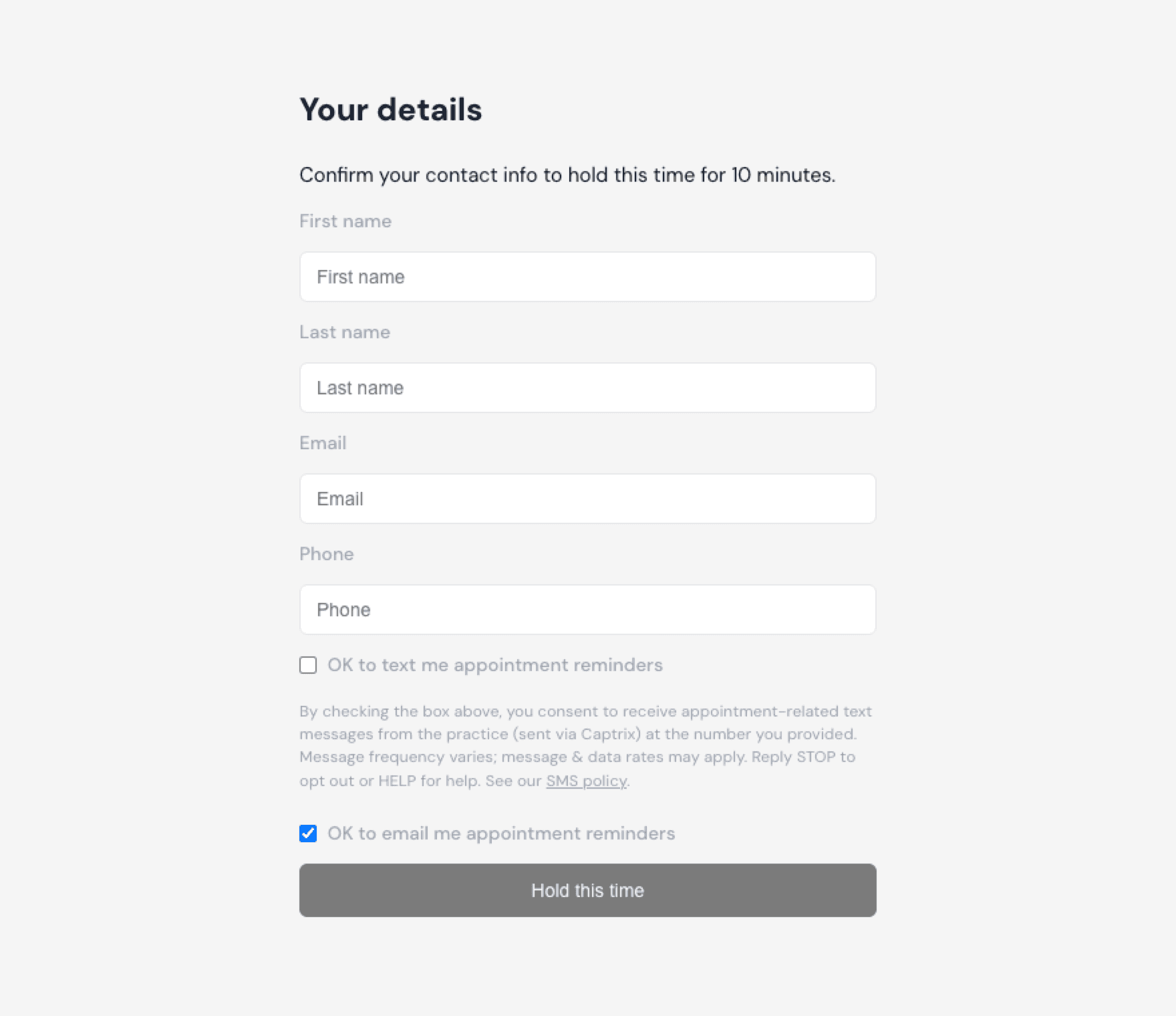
On a practice's Captrix-powered booking or intake form, an SMS consent checkbox sits directly beneath the mobile number field, separate from every other field. It is unchecked by default and is never pre-selected. Its label reads “OK to text me appointment reminders.” Immediately below it, this disclosure is shown before the form can be submitted: “By checking the box above, you consent to receive appointment-related text messages from the practice (sent via Captrix) at the number you provided. Message frequency varies; message & data rates may apply. Reply STOP to opt out or HELP for help.” The booking completes whether or not the box is checked. When it is checked, the consent, the exact disclosure text shown, and the timestamp are stored with the record.
2. Spoken consent on a phone call (verbal)
When you call a practice and reach its Captrix AI receptionist, the agent asks aloud whether the team may follow up with a text and tells you that you can reply STOP at any time. Consent is recorded only on an explicit spoken yes, and is stored against the specific call on which it was given. Silence, ambiguity, or simply leaving a callback number is not recorded as consent.
3. Texting the practice first (inbound message)
If you send a text message to a practice's Captrix number, that message is treated as consent to receive a reply at the number you texted from, for that practice only, so the office can answer you. You can end it at any time by replying STOP.
4. Practice staff on-call alerts (dashboard)
Practice staff receive operational alerts: an after-hours caller who may need attention, work waiting in the queue. This applies only to employees of a practice, never to patients, and the number is always a work mobile.
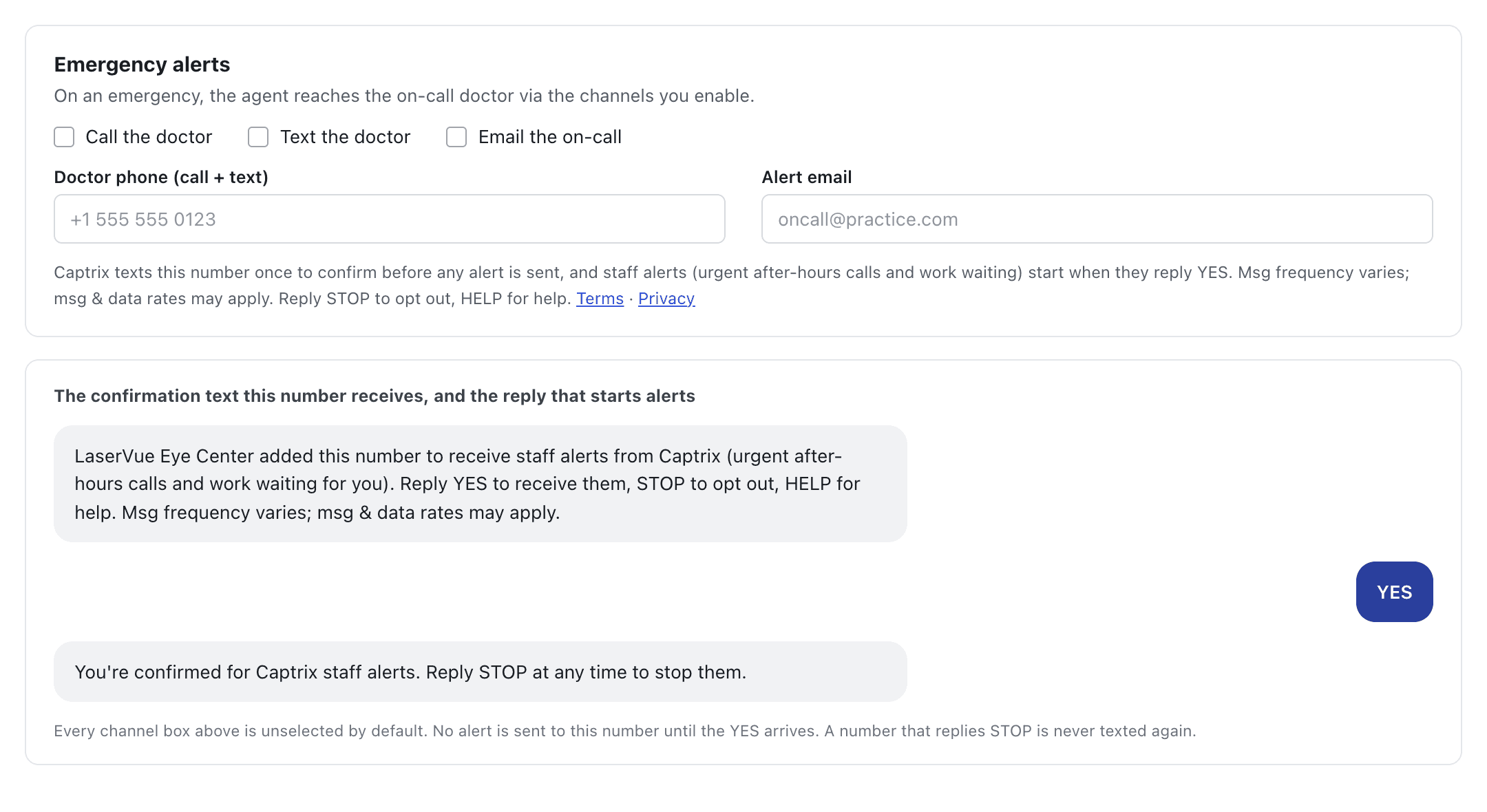
Every number confirms for itself, whoever typed it in. A staff member may enter their own mobile in the Captrix dashboard, and an administrator may enter a colleague's, most often the on-call doctor's. In both cases Captrix sends that number one message, shown below, naming the practice, what the alerts are, the frequency, that message & data rates may apply, and both keywords. Nothing else is ever sent to it until it replies YES. A number that replies STOP is never texted again, and nobody can restore it except that number itself, by replying START.
Until the YES arrives the number receives no alerts at all. An urgent after-hours call reaches the on-call clinician by phone and by email instead. Consent is recorded separately for each practice, so being reachable at one practice never enrolls you at another.
This is the consent language shown at the point where a patient provides their mobile number (online booking):
And where a staff mobile is entered in the Captrix dashboard: the disclosure shown at that point, and the confirmation text that number receives before it is sent anything else.
Message frequency & rates
Message frequency varies based on your interactions with the practice (for example, per appointment or per call). Message and data rates may apply.
Health information and these messages
These messages are sent for treatment and care-coordination purposes on behalf of your healthcare provider. They may reference details of your care, such as an appointment time, the provider you are seeing, or a procedure you asked about.
Text messaging is not a secure or encrypted channel. Messages may be seen by anyone with access to your phone, and may be stored by your mobile carrier. Before we send you a first text we tell you this, so you can decide whether text is the right way for the practice to reach you. If you would prefer we not use text for care-related messages, reply STOP or tell the practice and they will contact you another way.
Do not use text messages for emergencies. If you are experiencing a medical emergency, call 911 or go to your nearest emergency room. These messages are not monitored around the clock and are not a route to urgent clinical care.
Captrix operates as a business associate of the practice under HIPAA, and handles your information under a Business Associate Agreement with that practice. Consenting to text messages is never a condition of receiving treatment, and you may withdraw consent at any time without affecting your care.
How to opt out or get help
You can opt out of SMS at any time by replying STOP to any message; you will receive one confirmation message and no further texts. Reply HELP for help, or contact us at support@captrix.ai.
What our automatic replies say
These are the exact messages our system sends, so you know what to expect before you opt in.
- When you opt in
- “You are now signed up for appointment messages from your medical practice via Captrix. Msg frequency varies. Msg & data rates may apply. Reply HELP for help, STOP to cancel.”
- If you reply HELP
- “Captrix patient messaging. For help, email jack@captrix.ai or contact your medical practice directly. Msg & data rates may apply. Reply STOP to cancel.”
- If you reply STOP
- “You have been unsubscribed from Captrix messages for this practice and will receive no further texts. Reply START to resubscribe.”
Privacy & terms
Your information is handled in accordance with our Privacy Policy, and your use of this service is governed by our Terms of Service. No mobile information is shared with third parties or affiliates for marketing or promotional purposes.